
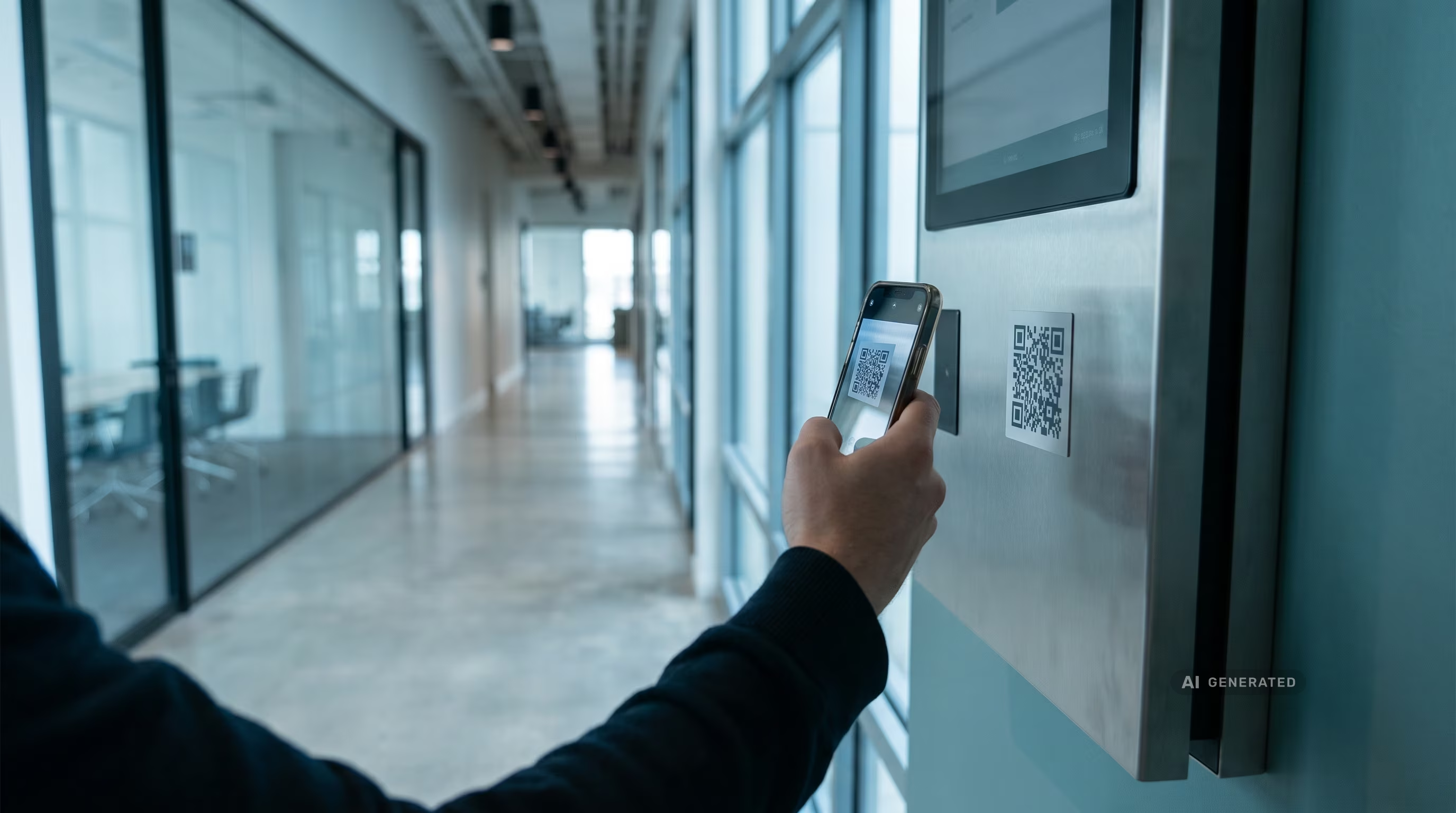
Scan-to-Report in Facility Management: Less downtime through faster reporting channels
Key Takeaways
- Without a digital asset file, a facility management issue report often takes 45–90 minutes because the nameplate, location, and history have to be searched for manually.
- According to IDC 2023, employees lose around 5.3 hours per week searching for equipment and location information.
- Scan-to-Report replaces phone chains and paperwork with a QR or RFID scan that transmits the error code, location, and maintenance history directly to the service provider.
- According to Forrester 2023, 73% of companies with an ERP system maintain parallel Excel lists for the very asset data that makes rapid reporting possible in the first place.
What is Scan-to-Report?
Scan-to-Report refers to a digital reporting process in facility management where an employee scans a physical asset via QR code or RFID tag to trigger a service request directly. The scan automatically provides the model number, location, warranty status, and maintenance history. The responsible service provider receives the complete report without anyone having to photograph nameplates, type in serial numbers, or look up information in Excel lists.
At its core, Scan-to-Report replaces three separate steps—identification, documentation, and transmission—with a single action at the device itself.
Why do FM issue reports take so long today?
A combi steamer in a hotel kitchen breaks down during breakfast service. A building's heating system has issues in the winter. In both cases, the same process unfolds: someone looks for the nameplate, notes down a serial number by hand, calls the caretaker or an external company, and hopes the information arrives in full.
Without a digital asset file, this process takes 45 to 90 minutes. With critical equipment—cold chains, heating systems, elevators—every minute counts. And while individual issues are being reported, the actual maintenance intervals for hundreds of other devices in the building go unnoticed because there is no central planning.
The problem is rarely a lack of will. It is a lack of structure: the maintenance history of a device is at best in Excel, spread across multiple tabs, and maintained by different people. Forrester confirms this pattern across industries: 73% of companies with an ERP system maintain parallel Excel lists because the ERP does not offer a practical way to record these specific operating assets.
What role does Excel play in slow incident reporting in facility management?
Excel lists rarely contain a unique identifier for each asset and lack automatic links to location or maintenance history. Anyone wanting to report a device issue has to find the corresponding row manually. seventhings replaces this list with a scanned identifier that provides the location, history, and contact person directly.
How exactly does scan-to-report work?
The process is intentionally kept short. An employee scans the asset with their smartphone, creates the damage report or takes a photo of the damage, and triggers the service request. Model number, location, last maintenance, and warranty status are attached automatically.
The service provider—whether internal or external—receives a complete report instead of a phone call with incomplete information. Once the repair is finished, the maintenance is documented directly on the device via the app, audit-proof and without any separate follow-up work in Excel.
Both QR codes and RFID tags compared to classic barcodesare suitable as identifiers, depending on how many assets need to be scanned at once and whether there is a line of sight to the tag.
In conversations with facility managers, I keep seeing the same effect: the biggest time savings don't come from the reporting process itself, but from the fact that no one has to switch between two systems anymore—one for reporting and one for the subsequent documentation.
What exactly changes regarding downtime?
In a seventhings use case from the hotel industry—involving combi steamers and other critical kitchen equipment—downtime is reduced by up to 60% thanks to scan-to-report, while simultaneously increasing the first-time fix rate. The reason: the technician knows the model, warranty status, and previous damage before even entering the room and doesn't have to research it on-site.
At the property level, a similar pattern emerges with technical systems like heating or ventilation: repair times drop significantly once the reporting chain no longer involves multiple phone calls, but instead provides all relevant data with the very first scan.
How much time do facility management teams save with scan-to-report?
According to IDC 2023, employees lose an average of 5.3 hours per week searching for asset and location information. Scan-to-report closes this gap by making location, model, and history immediately available upon scanning, instead of having to look them up manually. seventhings maps this process directly in the app.
What is the best maintenance planning software for facility management?
The right maintenance planning software depends on your asset portfolio. For stationary, networked equipment—such as elevators, fire alarm systems, and building management systems—a CAFM system remains the better choice compared to traditional asset management software.
In principle, there is no single best software, only the one that fits your specific asset portfolio. For the 80% of mobile and non-networked equipment in your facility—tools, conference technology, furniture, test equipment, and kitchen appliances without their own network connection—a CAFM system is usually insufficient because it is designed for networked systems. seventhings is built as middleware specifically to bridge this gap, consolidating case management, maintenance planning, and history into one system without replacing your ERP or CAFM.
Which workplace management software integrates well with facility management systems?
A workplace managementsoftware should be able to connect to existing FM and ERP systems via open APIs instead of creating another isolated database.
The key is ensuring that asset data from the workplace—furniture, conference technology, mobile devices—flows into the same downstream systems used by facility management for reporting and accounting. seventhings connects systems like SAP, DATEV, or Microsoft 365 via structured interfaces, thereby avoiding redundant data silos.
Who benefits most from Scan-to-Report?
Teams with a large number of mobile or stationary assets that lack their own network connection benefit the most: conference technology, furniture, mobile kitchen appliances, test equipment, and company phones without MDM. For the maintenance manager, this means one thing above all: a central overview instead of scattered notes and Excel spreadsheets. For systems with their own sensors—such as elevators, fire alarm systems, and building management systems—your existing CAFM system remains the right place to go. Scan-to-Report is the complement for everything those systems do not cover today.
Frequently asked questions about Scan-to-Report in facility management
Does Scan-to-Report replace our CAFM system?
No. Scan-to-Report complements CAFM systems by covering mobile and non-networked assets for which traditional CAFM software is usually too complex or not intended, such as tools, furniture, or conference equipment.
What hardware do we need for Scan-to-Report?
A smartphone is all you need to get started. QR codes can be attached to existing assets, while RFID tags are suitable for areas with high scan volumes, as multiple tags can be captured simultaneously without a direct line of sight.
How long does implementation take?
Based on seventhings' experience, the initial registration of a pilot area with around 200 assets can be completed in just a few days, including a pre-configured catalog and QR labels.
Does Scan-to-Report work without an internet connection?
Yes. Data capture also works offline; data is stored locally and synchronizes as soon as a connection is re-established—which is useful in basements, technical rooms, or underground garages.
What happens to the maintenance history after a repair?
It is documented directly on the device via the app and remains audit-proof and fully traceable, rather than having to be added later in a separate Excel list.














.svg)

.svg)
.svg)